The budget app that logs your income by itself.
A client pays, Shopify pings you with an order, SumUp beeps at the market stall. You already get the notification. uRekoin reads it, logs the income, puts your tax share aside and tells you what you can spend today. Your bank account stays yours: no connections, no passwords.


Free, no account, no sign-up.
The taxman is a business partner who never shows up to work
When you're self-employed, part of every payment belongs to taxes and social contributions. Your bank balance doesn't know that. It shows you 3,000 and you feel rich, until the tax bill turns up and a good chunk of it was never yours.
You know the fix: set the right percentage aside the moment you get paid, not at the end of the year. Doing it for every single payment, week after week, is another story. That's the part uRekoin does for you.
From notification to budget
Get paid as usual
A client's bank transfer, an order on your online shop, a card payment on your card reader. Your bank or app sends a notification, like it already does.
«New income coming in» pops up
Amount and sender already filled in. Pick the type (money received, refund, transfer between your accounts) and a category such as «Consulting» or «Shopify», then tap Save.
Taxes aside, budget updated
Your tax share goes into the tax pot. The rest raises this month's budget, and you see right away what you can spend today.
How much is really yours, at a glance
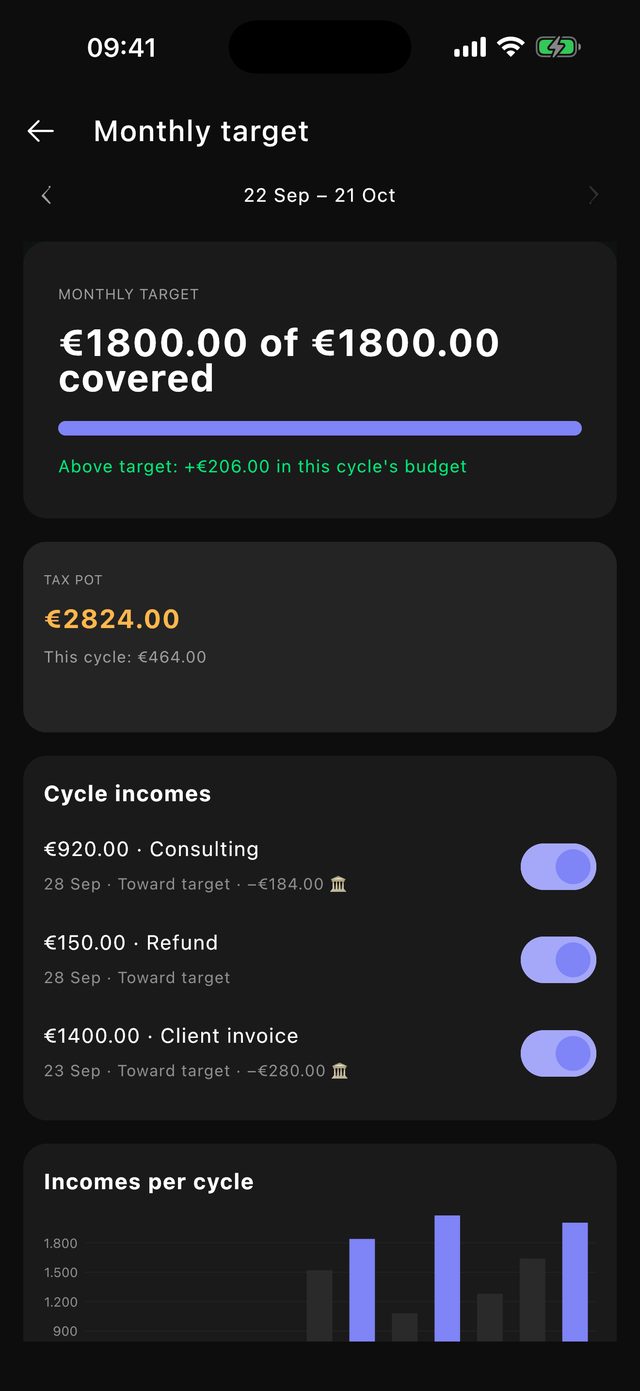
- Monthly target. Choose how much you need to live on each month. Until your income reaches it, the app plans with the target; every euro above it raises the month's budget.
- Tax pot. How much you've set aside in total and this month, payment by payment, plus your next tax instalment if you've added it to your planned expenses.
- Income per cycle. A chart of the last months, so the fat ones and the lean ones are easy to spot.
- Orders and payouts, together. Shopify announces the order today, the payout lands next week. When it does, you tick the orders it covers and nothing is counted twice.
- Expenses log themselves too. Card and wallet payments are logged from payment notifications, like for every uRekoin user.
Your bank, and the apps you get paid through
uRekoin recognises incoming money from banks that send a notification with the amount: see the supported banks. On Android you can also add the apps you only use to get paid:
You pick them once in Settings › Merchants and banks, answering «I only use it to get paid». uRekoin only reads the notification: it never logs into your shop and never sees your customers' data.
What uRekoin doesn't do
- It doesn't send invoices or file your tax return.
- It doesn't replace your accountant: you choose the percentage to set aside.
- If your bank doesn't notify incoming money, or a client pays cash, you add it by hand with the + button in a few seconds.
- On iPhone, automatic reading needs iOS 27 and a shortcut you install once: here's how.
- The app is in English, Italian, French, German and Spanish, and works with about 150 currencies.
Freelancing and uRekoin
Is there an app that logs freelance income automatically?
Yes. uRekoin reads the notifications you already get on your phone: the bank telling you a transfer landed, Shopify's «new order», a PayPal or SumUp payment. It shows you the amount and who sent it, you pick what kind of income it is and tap Save. No bank connection, nothing to type.
How do I put money aside for taxes every time I get paid?
In Settings › Other income, enter the percentage you want to set aside. From then on, every time you save some income, uRekoin moves that share into the tax pot and works out your daily budget on what's left.
Does it work with my bank?
It works with banks that send a notification when money comes in, with the amount in it. Most do, but you may need to switch that alert on in your banking app. The list of recognised banks is on the Supported banks page. If yours isn't there, uRekoin asks whether it's your bank the first time it sees one of its notifications.
I sell on Shopify, Etsy or Vinted. Does it see my orders?
On Android, yes. Go to Settings › Merchants and banks › My banks, tap Add, pick the app and answer «I only use it to get paid». From then on every notification from that app with an amount becomes income, never an expense. When the actual payout lands, the app asks which orders it covers, so nothing gets counted twice.
What about iPhone?
On iPhone no app can read other apps' notifications on its own. With iOS 27, uRekoin gets them through a shortcut you install once: it recognises money arriving from your bank and typical seller phrases like «new order». You add your selling apps to the shortcut yourself. On older iOS versions you add income by hand or from a screenshot.
Does uRekoin do invoices or tax returns?
No. It doesn't send invoices, it doesn't file anything and it doesn't replace your accountant. It tells you, every day, how much of the money in your account is really yours and how much belongs to the taxman.
How much does it cost?
Freelance mode is free, with ads. There is an optional Premium subscription that removes the ads and unlocks a few extras, such as the full history of past months.
Does my data end up on a server?
No. Income, expenses and budgets stay on your phone. uRekoin never asks for your bank login, doesn't use open banking and has no accounts: notification text never leaves the device.
Try it with your next payment
Install it, pick «Freelance» mode, enter your tax percentage. Next time a client pays, watch what happens.